
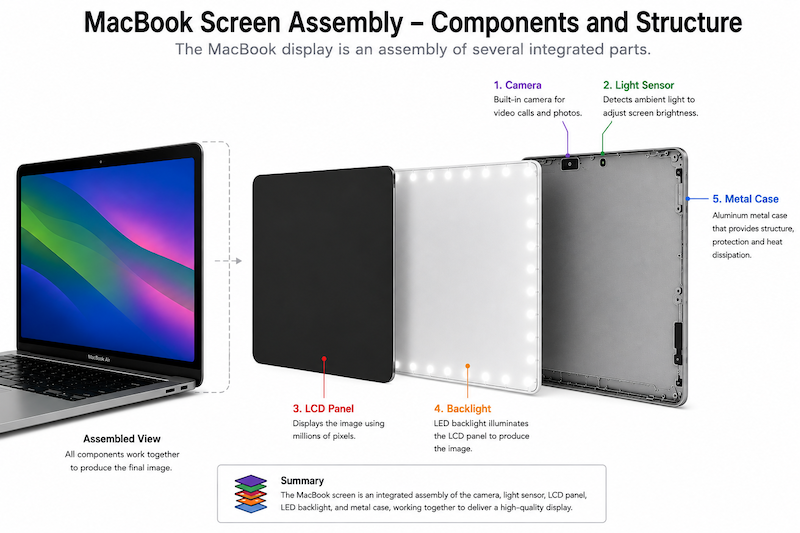
A MacBook screen assembly is made up of 5 major components. Case, backlight, camera, light sensor and LCD panel.
A Liquid Crystal Display (LCD) works like a system of adjustable window blinds.
A continuous light source sits at the back of the LCD and the liquid crystals act as microscopic light valves that untwist and straighten out when an electrical charge is applied.
On the entire inside surfaces of the glass screen is a matrix of almost transparent wires and transistors that apply these charges to the liquid crystals.
When the screen is damaged it is usually the glass that cracks. Any crack will cause breaks in the circuitry and result in the loss of parts of the display.
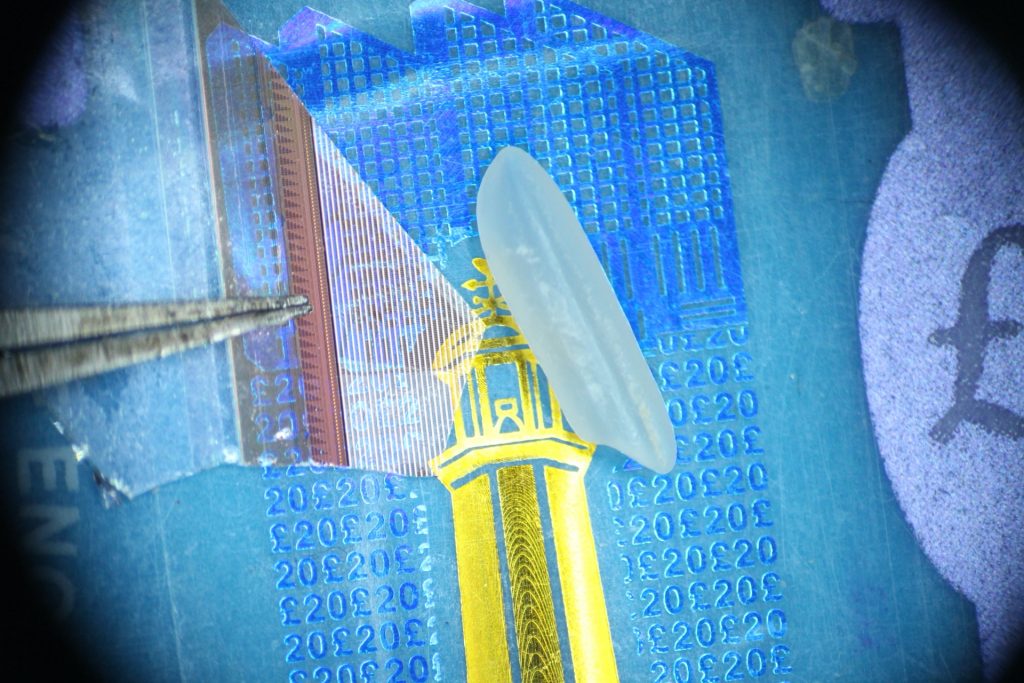
This photo shows a small piece of glass from a broken LCD panel. To show its transparency it is placed on top of a £20 note and for size comparison next to a grain of rice. The tip of the tweezers points to the very fine array of pixel elements.
WARRANTY
A claim within the warranty will always be rejected by any supplier (me included) if there is evidence of abuse. Evidence of abuse can be spotted relatively easily. It could be a crack in the glass visible when the screen is unpowered or a dent in the metal case indicating a high G-force event previously occurred. If an LCD panel has stopped working within 365 days of installation and there is no chip or crack in the glass or dent in the metalwork I will replace it.
CLEANING
The front surface of any MacBook screen is actually plastic so plastic cleaner like VuPlex is an appropriate choice. Water, isoproply alcohol are other common choices. Whatever you use – you should wring out the cloth completely of any drips before allowing it near the screen. If you use excessive liquid and a drop settles on the rubber gasket at the edge of the screen it can get sucked into the screen backlight by capillary action which will produce a large stain visible when the screen is powered and there is no way to clean behind the screen.
HOW TO OPEN AND CLOSE THE LID
I’ve seen people break the glass just by their technique of opening the lid of the MacBook. The best way to open or close a MacBook lid is by touching only the metalwork and never stressing the glass. Never ever lift the MacBook with an open lid by grabbing the lid between thumb and forefinger therefore pressing on the display. That lift could cost you between £300 and £700! Closing the lid on a lead, a decorative bead stuck on the palm-rest or a 1mm thick camera sliding cover can cost the same. Stop touching the screen glass and you will be amazed how clean it stays.
DELAMINATION
After several years you may notice loss of the antireflective coating usually near to the camera but also where the keycaps sometimes touch the screen. It can look unsightly but is rarely noticed when the MacBook screen is illuminated. The anti-reflective coating can be removed chemically to produce reveal a glossy screen.
CLONE SCREENS
Non-genuine screens can be half the price of a genuine Apple screen and this makes them attractive to some. I say they should be avoided because they are not made to last. They may be made just to last their 90 day warranty period. Usually its their backlight that lets them down. Their camera quality may also be not up to spec. I will comment this way – I don’t sell clone screen assemblies because I dont trust their reliability and so I wont install a new LCD panel into a non-genuine screen because I am not prepared to give it a 365 day warranty when the supporting parts are not of Apple quality.