
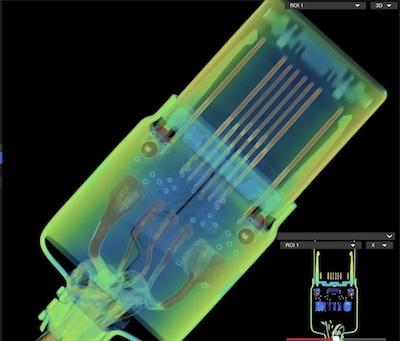
When you plug a lead into a USB C socket on your MacBook the metal fingers (conductors) within the plug contact metal pads in the socket. Wear is minimal and acceptable because these sockets are replaceable by an experienced technician.
This is a CT scan of a low speed USB C plug showing the metal fingers. A high speed USB C plug would have 24 metal fingers.
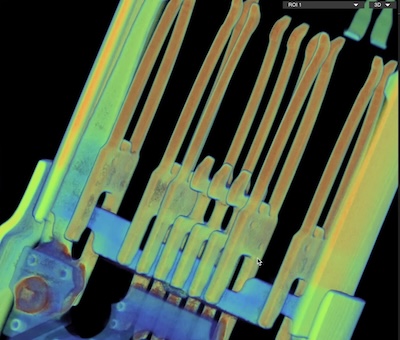
Oblique CT scan of the same USB C plug
When the USB lead is in poor condition or of low quality manufacture wear to the MacBooks USB socket can happen quite quickly and the metal pads in the socket can actually start to split apart.
If the conductors become split there is real danger of causing a short in the socket. Even a momentary short can permanently damage the CD3217 chip that is connected to each USB C socket. This damage will not be immediately evident because the MacBook might continue running with a damaged CD3217 but the next attempt to start the MacBook fails.
So if you detect a bad ‘feel’ compared to others when you insert a particular USB lead into any socket stop using that lead and replace it. If it appears to be a certain socket that has a strange ‘feel’ stop using that socket – tape it up. Use other sockets and have your MacBook inspected by a specialist sooner than later.
This photo shows the tongue of a worn out USB C socket inside a MacBook. Note how three of the metal pads are beginning to split as they flatten and wear out. This is caused by use of poor quality USB leads that have scored the metal pads and/or applied too much force. This USB socket was replaced just in time before it caused expensive damage to the logic board.
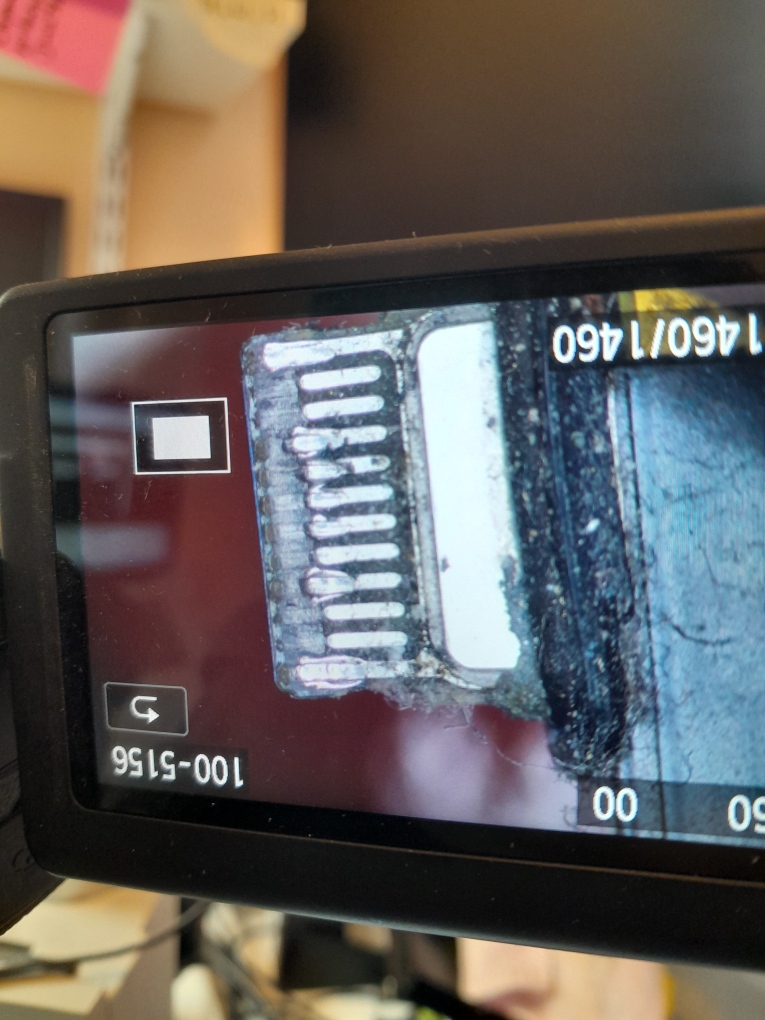
USB sockets don’t last forever and should be replaced before they get this bad. They will be inspected and reported on as part of a standard MacBook service.
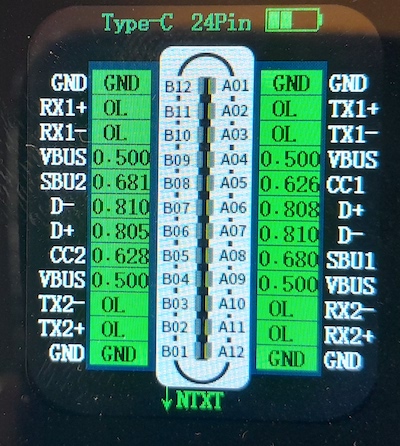
This photo depicts a USB C socket in white along with measurements and names of the pins. When you connect a charger your MacBook communicates with it over the CC1 or CC2 communication lines and negotiates a change in VBUS voltage from 5volts up to 20volts. Note how the VBUS lines are next to the communication lines. If wear causes a short between VBUS and CC1/CC2 it permanently damages the CD3217 chip inside your MacBook and your MacBook wont start next time.
This photo shows a CD3215 chip (similar to a CD3217). It is 6mm square and has 96 microscopic solder ball connections that join it to the logic board. Replacing it is a complex process and takes around 2 – 3 hours of skilled precision work under a microscope.

Replacing CD3215 and CD3217 chips is specialist work we do each and every day.
If Apple was presented with this MacBook, I guarantee, they would say the logic board must be replaced (a lie) and quote you 70% to 90% of the cost of a new MacBook to replace it.
This is a sales tactic intended to lead you into abandoning your faulty MacBook and buying a new MacBook.
Fortunately, at UK Mac Repair, we have the specialist tools and expertise to repair the existing logic board — preserving your investment and costing less than half of an Apple repair.
It’s this level of attention to detail, technical depth and commitment to saving both your data and your money that makes the difference when your MacBook really matters.