A damaged charging lead can destroy your MacBook [more than once]
A damaged charging lead can silently destroy a MacBook— and it’s something most people would never think to check.
A year ago I repaired a customers MacBook following liquid damage and 2 weeks ago the customer brought it back saying it would not turn on. On inspection I found that this time it was not a problem with liquid but an electrically damaged CD3217 chip. This is a sophisticated microchip that interfaces with anything you plug into a USB port. This includes external disk drives, 4k video and even heavy current for charging the battery. But it is use of a non-genuine charger that is the most common cause of a faulty CD3217. Cheap look-a-like “compatible” chargers commonly sold online often lack the proper filtering components needed to protect your MacBook from voltage spikes caused by bad mains connections or electrical interference from everyday appliances switching on and off like heaters.
The owner assured me he only used a genuine charger so I assumed that the damage was caused by a build up of metal shavings from wear and tear in the USB leads and sockets on the MacBook causing a short circuit.
Diagnosis of a dead MacBook and replacement of a damaged CD3217 chip is a complex process taking about 2 – 3 hours. It involves creating nearly 100 microscopic solder balls on the new chip, preparing the logic board after removal of the faulty chip and precision micro-soldering under a microscope. The skill is acquired after many failed attempts as every solder ball must connect to its respective pad on the logic board.
Replacing a CD3217 chip is a complex process and takes around 2 – 3 hours of precision microsoldering under a microscope — each 6mm square chip has 96 microscopic solder ball connections.
I was alarmed to hear that two weeks later the MacBook would not turn on again – the customer was very frustrated and understandably wanted a repair under warranty as it was suffering the same problem as just 2 weeks before – not turning on.
Again, I had to ask – has a non-genuine charger been used? The customer was certain they had only ever used a genuine Apple charger. That told me we needed to look deeper. I asked to see everything regularly connected to the MacBook — including the USB-C charging cable itself.
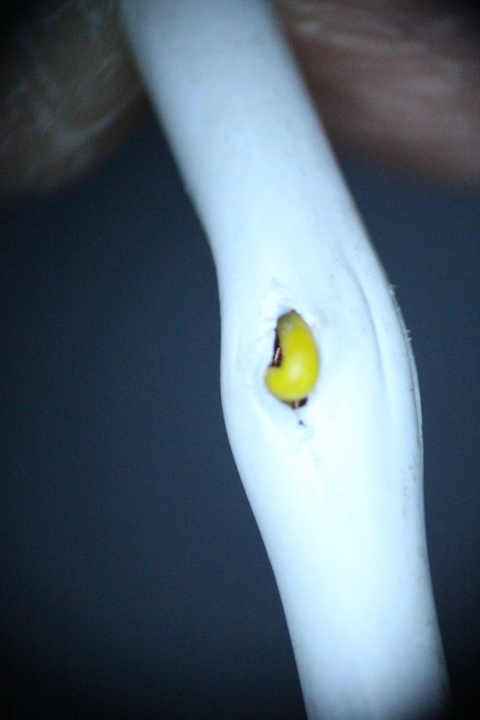
A close inspection revealed something incredibly subtle: a tiny bulge in the cable insulation of the USB lead used for charging. When the insulation was examined more closely, a yellow internal wire was visible. This lead had a previous injury that had gone unnoticed but was to prove that even the smallest irregularity can indicate serious internal damage.
Using test equipment, I discovered the truth. The yellow Configuration Channel 2 (CC2) wire — which normally carries low-voltage communication signals between the MacBook and the charger — was intermittently shorting against the VBUS power line. That means a wire designed to carry just 0.25 volts to 1.5 volts was occasionally being hit with 20 volts.
That surge is more than enough to destroy a CD3217 chip, a critical component responsible for USB-C communication on each port of a MacBook.
When I carefully removed the outer insulation it revealed internal damage that was far worse than I thought possible.
The red VBUS wire was stripped bare, with broken strands able to short directly into the CC2 line through a pin-sized hole in the yellow insulation. Unfortunately, human nature can make things even worse. When one charging port didn’t work, the owner naturally tried the remaining ports — unknowingly sending damaging voltage through all four. As a result, all four CD3217 chips on the logic board had failed. Repairing all four would mean 8 to 12 hours of painstaking work.
This customer had been so unlucky. First to have a liquid spill but then to unknowingly damage the charging lead which lead to two further deaths of his MacBooks logic board. His only luck was not going to Apple for repair as their solution in every case is straightforward but costly: replace the entire logic board and lose all data in the process. Each of the 3 events would have clocked up at least £500 in Apple charges and could have severely affected his business through loss of data.
Fortunately, at UK Mac Repair, we have the specialist tools and expertise to go further. In this case, we were able to safely extract the customer’s data directly from the damaged logic board and transfer it to a replacement — preserving everything and costing less than half of an Apple repair.
It’s this level of attention to detail, technical depth and commitment to saving both your data and your money that makes the difference when your MacBook really matters.